
Listing Group Members
You can list the members of a Fuzzball group using the CLI fuzzball group member list command.
Group members and their owner status can also be viewed through the Web UI.
$ fuzzball group member list [flags]To view group members through the Web UI:
Log into your Fuzzball UI with appropriate permissions
Click on the account switcher in the top left of the dashboard (which displays your current group name)
In the dropdown menu, select Group Membership
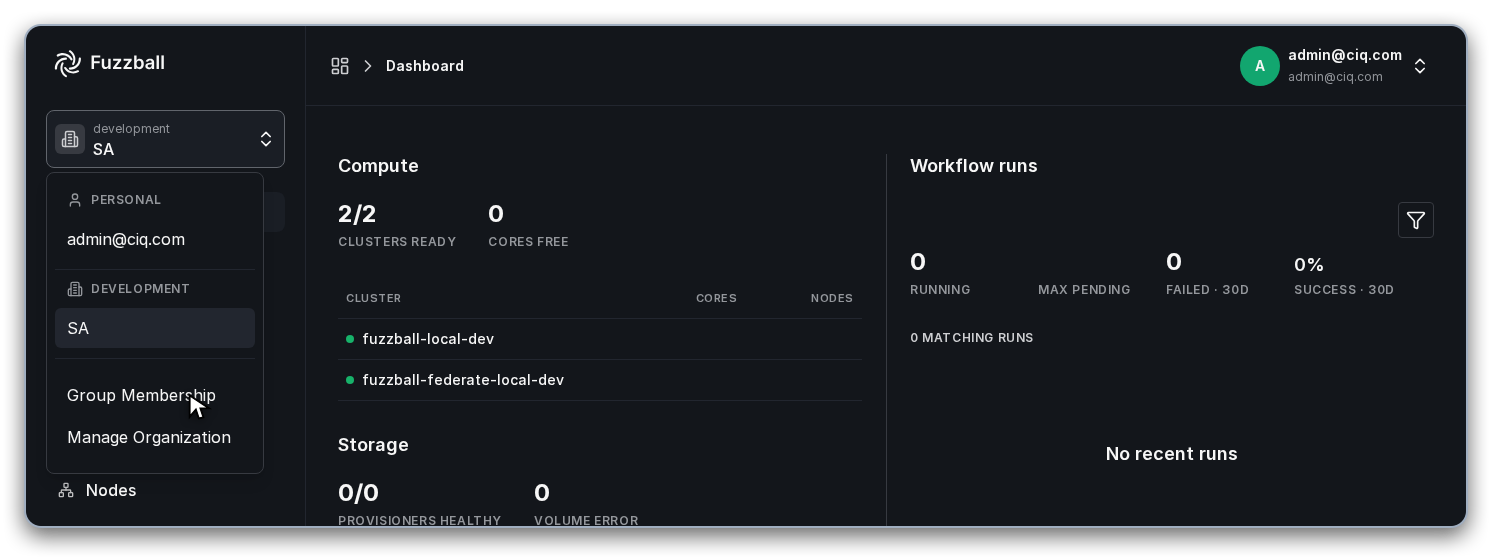
Select the group you want to view from the groups list
The group’s Members tab lists every user in the group, with each user’s role shown in the Role column
The group page also has a Node Provisioners tab; members and owners are not split across separate tabs. Sort or filter on the Role column to see them separately.
By default, this returns everyone, both owners and regular members. Use --owner to list only
owners, or --owner=false to list only non-owners.
List all members (owners and non-owners) of the group research-lab:
$ fuzzball group member list --group=research-labList only the owners of the group:
$ fuzzball group member list --owner --group=research-labList only non-owner members:
$ fuzzball group member list --owner=false --group=research-lab